Instructions to use Obrolin/Kesehatan-7B-v0.1 with libraries, inference providers, notebooks, and local apps. Follow these links to get started.
- Libraries
- Transformers
How to use Obrolin/Kesehatan-7B-v0.1 with Transformers:
# Use a pipeline as a high-level helper from transformers import pipeline pipe = pipeline("text-generation", model="Obrolin/Kesehatan-7B-v0.1") messages = [ {"role": "user", "content": "Who are you?"}, ] pipe(messages)# pip install -U transformers accelerate # Load model directly from transformers import AutoTokenizer, AutoModelForCausalLM tokenizer = AutoTokenizer.from_pretrained("Obrolin/Kesehatan-7B-v0.1") model = AutoModelForCausalLM.from_pretrained("Obrolin/Kesehatan-7B-v0.1", device_map="auto") messages = [ {"role": "user", "content": "Who are you?"}, ] inputs = tokenizer.apply_chat_template( messages, add_generation_prompt=True, tokenize=True, return_dict=True, return_tensors="pt", ).to(model.device) outputs = model.generate(**inputs, max_new_tokens=256) print(tokenizer.decode(outputs[0][inputs["input_ids"].shape[-1]:])) - Notebooks
- Google Colab
- Kaggle
- Local Apps Settings
- vLLM
How to use Obrolin/Kesehatan-7B-v0.1 with vLLM:
Install from pip and serve model
# Install vLLM from pip: pip install vllm # Start the vLLM server: vllm serve "Obrolin/Kesehatan-7B-v0.1" # Call the server using curl (OpenAI-compatible API): curl -X POST "http://localhost:8000/v1/chat/completions" \ -H "Content-Type: application/json" \ --data '{ "model": "Obrolin/Kesehatan-7B-v0.1", "messages": [ { "role": "user", "content": "What is the capital of France?" } ] }'Use Docker
docker model run hf.co/Obrolin/Kesehatan-7B-v0.1
- SGLang
How to use Obrolin/Kesehatan-7B-v0.1 with SGLang:
Install from pip and serve model
# Install SGLang from pip: pip install sglang # Start the SGLang server: python3 -m sglang.launch_server \ --model-path "Obrolin/Kesehatan-7B-v0.1" \ --host 0.0.0.0 \ --port 30000 # Call the server using curl (OpenAI-compatible API): curl -X POST "http://localhost:30000/v1/chat/completions" \ -H "Content-Type: application/json" \ --data '{ "model": "Obrolin/Kesehatan-7B-v0.1", "messages": [ { "role": "user", "content": "What is the capital of France?" } ] }'Use Docker images
docker run --gpus all \ --shm-size 32g \ -p 30000:30000 \ -v ~/.cache/huggingface:/root/.cache/huggingface \ --env "HF_TOKEN=<secret>" \ --ipc=host \ lmsysorg/sglang:latest \ python3 -m sglang.launch_server \ --model-path "Obrolin/Kesehatan-7B-v0.1" \ --host 0.0.0.0 \ --port 30000 # Call the server using curl (OpenAI-compatible API): curl -X POST "http://localhost:30000/v1/chat/completions" \ -H "Content-Type: application/json" \ --data '{ "model": "Obrolin/Kesehatan-7B-v0.1", "messages": [ { "role": "user", "content": "What is the capital of France?" } ] }' - Docker Model Runner
How to use Obrolin/Kesehatan-7B-v0.1 with Docker Model Runner:
docker model run hf.co/Obrolin/Kesehatan-7B-v0.1
# pip install -U transformers accelerate
# Load model directly
from transformers import AutoTokenizer, AutoModelForCausalLM
tokenizer = AutoTokenizer.from_pretrained("Obrolin/Kesehatan-7B-v0.1")
model = AutoModelForCausalLM.from_pretrained("Obrolin/Kesehatan-7B-v0.1", device_map="auto")
messages = [
{"role": "user", "content": "Who are you?"},
]
inputs = tokenizer.apply_chat_template(
messages,
add_generation_prompt=True,
tokenize=True,
return_dict=True,
return_tensors="pt",
).to(model.device)
outputs = model.generate(**inputs, max_new_tokens=256)
print(tokenizer.decode(outputs[0][inputs["input_ids"].shape[-1]:]))Obrolin Kesehatan!
Sesuai dengan namanya, Kesehatan! model AI ini telah dilatih dengan berbagai dataset di bidang kesehatan dalam Bahasa Indonesia seperti penyakit, obat-obatan, dan lain lain yang berhubungan dengan kesehatan!
Meskipun "Obrolin Kesehatan" dirancang untuk memberikan informasi kesehatan yang bermanfaat, perlu diingat bahwa jawaban yang dihasilkan oleh model ini tidak selalu akurat dan tidak dapat menggantikan konsultasi langsung dengan dokter
Anggap temen ngobrol aja ya :)
As the name suggests, Health! This AI model has been drilled with various datasets in the health sector in Bahasa Indonesia such as diseases, medicines, and others related to health!
Although "Obrolin Kesehatan" is designed to provide useful health information, please remember that the answers generated by this model are not always accurate and cannot replace direct consultation with a doctor
Just think of it as friends, okay? :)
System Prompt (Optional) :
Kamu adalah Obrolin, asisten AI yang memiliki pengetahuan di bidang kesehatan
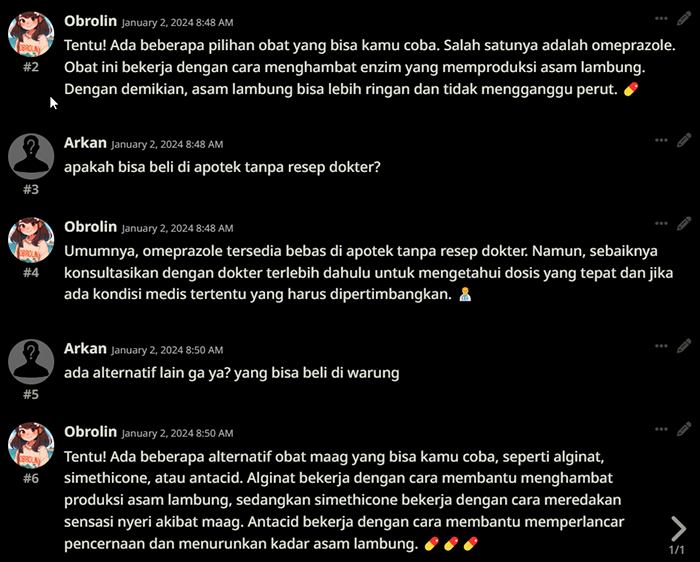
Output Example :
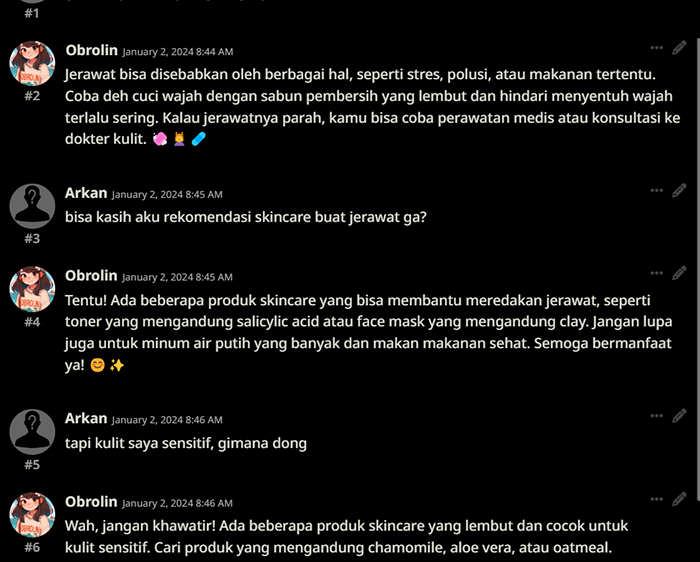
SillyTavern default settings, Q8_0.GGUF
Still in alpha build, don't expect perfection just yet :)
License
This model is made available under the CC BY-NC 4.0 license, which allows anyone to share and adapt the material for non-commercial purposes, with appropriate attribution.
Based on azale-ai/Starstreak-7b-beta!
@software{Hafidh_Soekma_Startstreak_7b_beta_2023,
author = {Hafidh Soekma Ardiansyah},
month = october,
title = {Startstreak: Traditional Indonesian Multilingual Language Model},
url = {\url{https://huggingface.co/azale-ai/Starstreak-7b-beta}},
publisher = {HuggingFace},
journal = {HuggingFace Models},
version = {1.0},
year = {2023}
}
Citation
@misc{Obrolin/Kesehatan-7B,
author = {Arkan Bima},
title = {Obrolin Kesehatan},
publisher = {Hugging Face},
howpublished = {\url{https://huggingface.co/Obrolin/Kesehatan-7B}},
version = {0.1},
year = {2024},
}
- Downloads last month
- 59
# Use a pipeline as a high-level helper from transformers import pipeline pipe = pipeline("text-generation", model="Obrolin/Kesehatan-7B-v0.1") messages = [ {"role": "user", "content": "Who are you?"}, ] pipe(messages)