

Qwen3 Technical Report
Paper • 2505.09388 • Published • 341

Over the past few months, we have observed increasingly clear trends toward scaling both total parameters and context lengths in the pursuit of more powerful and agentic artificial intelligence (AI). We are excited to share our latest advancements in addressing these demands, centered on improving scaling efficiency through innovative model architecture. We call this next-generation foundation models Qwen3-Next.
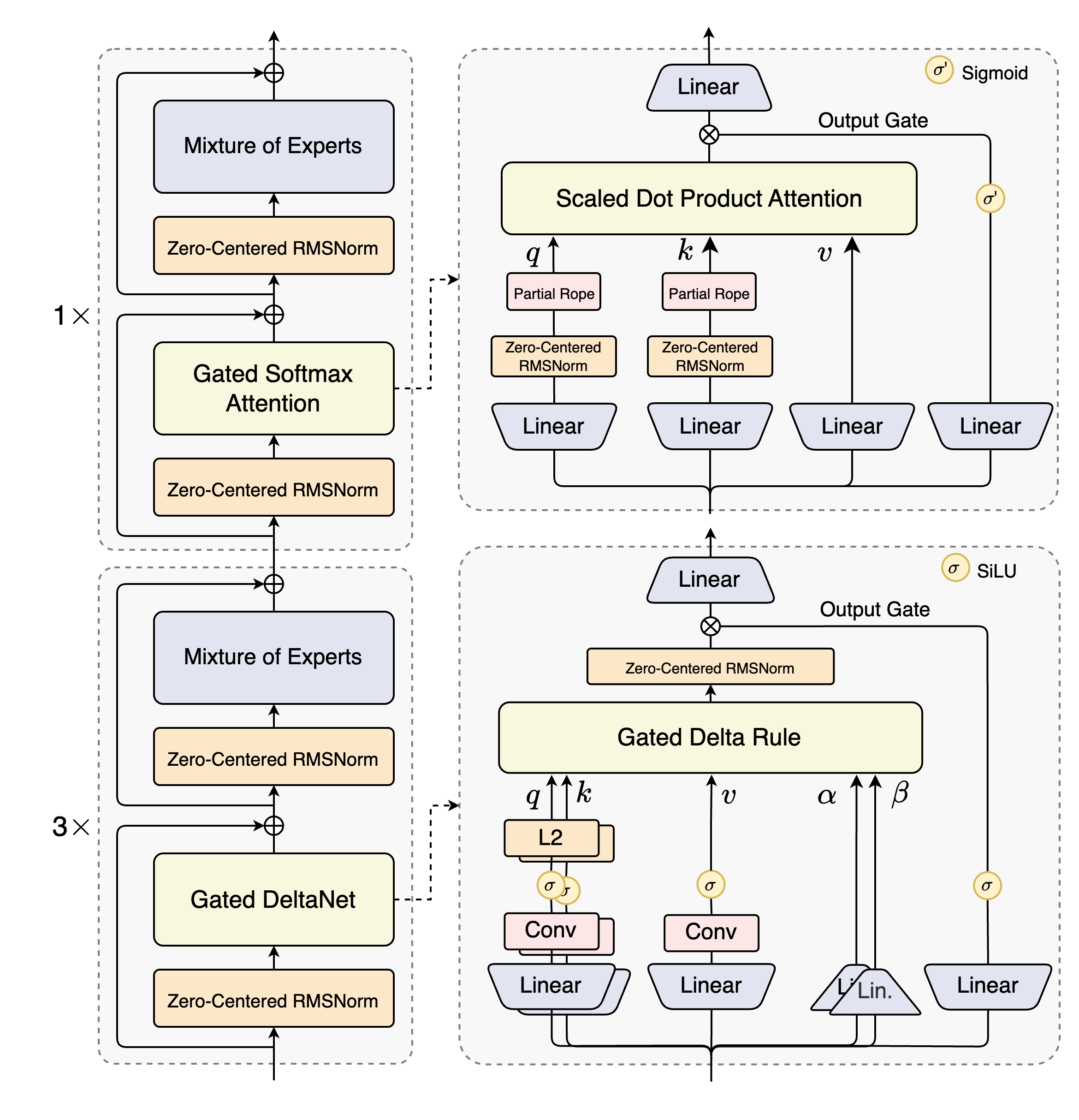
Qwen3-Next-80B-A3B is the first installment in the Qwen3-Next series and features the following key enchancements:
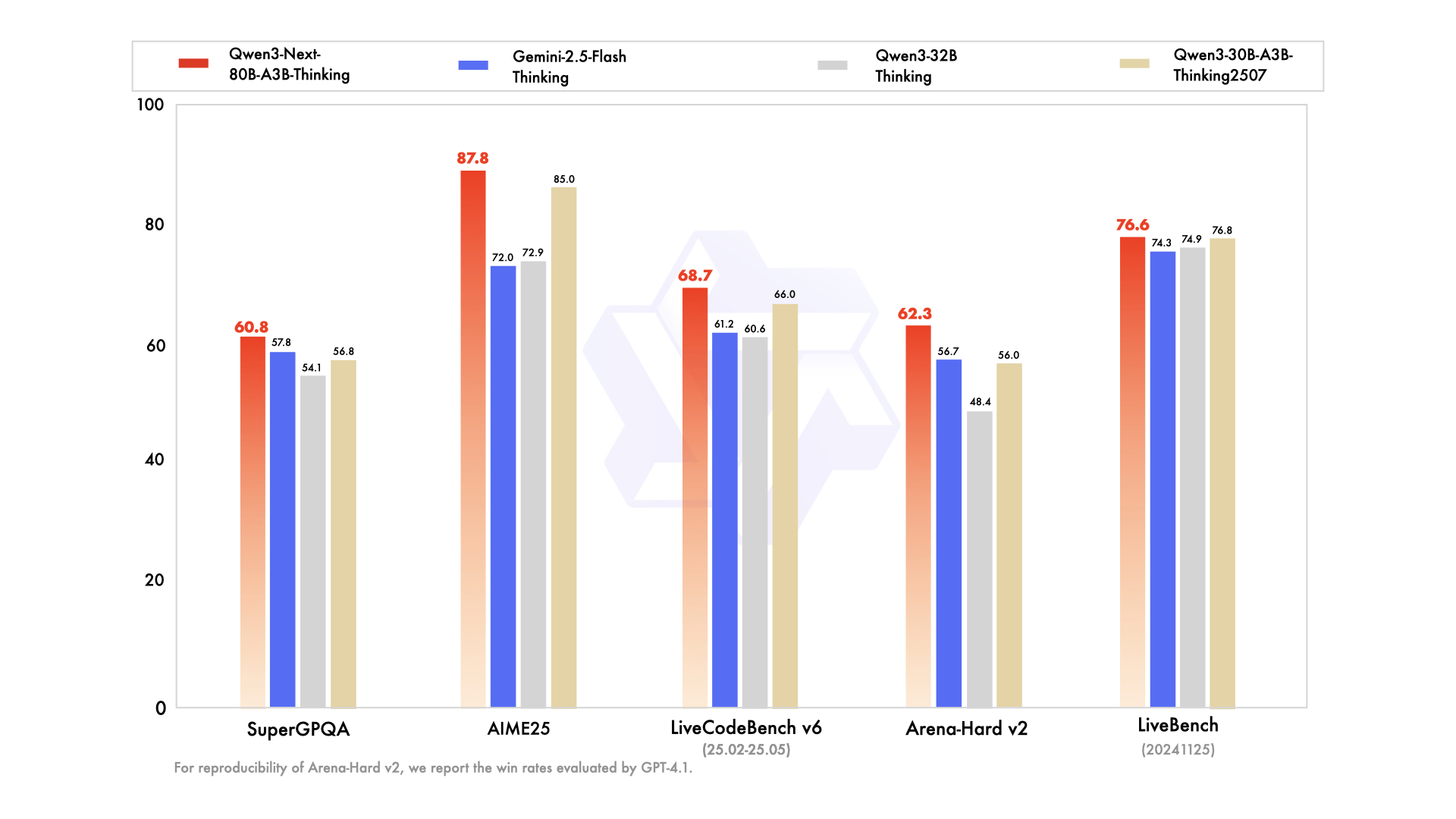
We are seeing strong performance in terms of both parameter efficiency and inference speed for Qwen3-Next-80B-A3B:
For more details, please refer to our blog post Qwen3-Next.
Qwen3-Next-80B-A3B-Thinking supports only thinking mode. To enforce model thinking, the default chat template automatically includes
<think>. Therefore, it is normal for the model's output to contain only</think>without an explicit opening<think>tag.
Qwen3-Next-80B-A3B-Thinking may generate thinking content longer than its predecessor. We strongly recommend its use in highly complex reasoning tasks.
Qwen3-Next-80B-A3B-Thinking has the following features:
| Qwen3-30B-A3B-Thinking-2507 | Qwen3-32B Thinking | Qwen3-235B-A22B-Thinking-2507 | Gemini-2.5-Flash Thinking | Qwen3-Next-80B-A3B-Thinking | |
|---|---|---|---|---|---|
| Knowledge | |||||
| MMLU-Pro | 80.9 | 79.1 | 84.4 | 81.9 | 82.7 |
| MMLU-Redux | 91.4 | 90.9 | 93.8 | 92.1 | 92.5 |
| GPQA | 73.4 | 68.4 | 81.1 | 82.8 | 77.2 |
| SuperGPQA | 56.8 | 54.1 | 64.9 | 57.8 | 60.8 |
| Reasoning | |||||
| AIME25 | 85.0 | 72.9 | 92.3 | 72.0 | 87.8 |
| HMMT25 | 71.4 | 51.5 | 83.9 | 64.2 | 73.9 |
| LiveBench 241125 | 76.8 | 74.9 | 78.4 | 74.3 | 76.6 |
| Coding | |||||
| LiveCodeBench v6 (25.02-25.05) | 66.0 | 60.6 | 74.1 | 61.2 | 68.7 |
| CFEval | 2044 | 1986 | 2134 | 1995 | 2071 |
| OJBench | 25.1 | 24.1 | 32.5 | 23.5 | 29.7 |
| Alignment | |||||
| IFEval | 88.9 | 85.0 | 87.8 | 89.8 | 88.9 |
| Arena-Hard v2* | 56.0 | 48.4 | 79.7 | 56.7 | 62.3 |
| WritingBench | 85.0 | 79.0 | 88.3 | 83.9 | 84.6 |
| Agent | |||||
| BFCL-v3 | 72.4 | 70.3 | 71.9 | 68.6 | 72.0 |
| TAU1-Retail | 67.8 | 52.8 | 67.8 | 65.2 | 69.6 |
| TAU1-Airline | 48.0 | 29.0 | 46.0 | 54.0 | 49.0 |
| TAU2-Retail | 58.8 | 49.7 | 71.9 | 66.7 | 67.8 |
| TAU2-Airline | 58.0 | 45.5 | 58.0 | 52.0 | 60.5 |
| TAU2-Telecom | 26.3 | 27.2 | 45.6 | 31.6 | 43.9 |
| Multilingualism | |||||
| MultiIF | 76.4 | 73.0 | 80.6 | 74.4 | 77.8 |
| MMLU-ProX | 76.4 | 74.6 | 81.0 | 80.2 | 78.7 |
| INCLUDE | 74.4 | 73.7 | 81.0 | 83.9 | 78.9 |
| PolyMATH | 52.6 | 47.4 | 60.1 | 49.8 | 56.3 |
*: For reproducibility, we report the win rates evaluated by GPT-4.1.
Check out our llama.cpp documentation for more usage guide.
We advise you to clone llama.cpp and install it following the official guide. We follow the latest version of llama.cpp.
In the following demonstration, we assume that you are running commands under the repository llama.cpp.
./llama-cli -hf Qwen/Qwen3-Next-80B-A3B-Thinking-GGUF:Q8_0 --jinja --color -ngl 99 -fa on -sm row --temp 0.6 --top-k 20 --top-p 0.95 --min-p 0 --presence-penalty 1.5 -c 262144 -n 256000 --no-context-shift
Qwen3 natively supports context lengths of up to 262,144 tokens. For conversations where the total length (including both input and output) significantly exceeds this limit, we recommend using RoPE scaling techniques to handle long texts effectively. We have validated the model's performance on context lengths of up to 131,072 tokens using the YaRN method.
To enable YARN in llama.cpp:
./llama-cli ... -c 1010000 --rope-scaling yarn --rope-scale 4 --yarn-orig-ctx 262144
Qwen3 excels in tool calling capabilities. We recommend using Qwen-Agent to make the best use of agentic ability of Qwen3. Qwen-Agent encapsulates tool-calling templates and tool-calling parsers internally, greatly reducing coding complexity.
To define the available tools, you can use the MCP configuration file, use the integrated tool of Qwen-Agent, or integrate other tools by yourself.
from qwen_agent.agents import Assistant

# Define LLM
# Using Alibaba Cloud Model Studio
llm_cfg = {
    'model': 'Qwen3-Next-80B-A3B-Thinking',
    'model_type': 'qwen_dashscope',
}

# Using OpenAI-compatible API endpoint. It is recommended to disable the reasoning and the tool call parsing
# functionality of the deployment frameworks and let Qwen-Agent automate the related operations. For example,
# `vllm serve Qwen/Qwen3-Next-80B-A3B-Thinking --served-model-name Qwen3-Next-80B-A3B-Thinking --port 8000 --tensor-parallel-size 4 --max-model-len 262144`.
#
# llm_cfg = {
#     'model': 'Qwen3-Next-80B-A3B-Thinking',
#
#     # Use a custom endpoint compatible with OpenAI API:
#     'model_server': 'http://localhost:8000/v1',  # api_base without reasoning and tool call parsing
#     'api_key': 'EMPTY',
#     'generate_cfg': {
#         'thought_in_content': True,
#     },
# }

# Define Tools
tools = [
    {'mcpServers': {  # You can specify the MCP configuration file
            'time': {
                'command': 'uvx',
                'args': ['mcp-server-time', '--local-timezone=Asia/Shanghai']
            },
            "fetch": {
                "command": "uvx",
                "args": ["mcp-server-fetch"]
            }
        }
    },
  'code_interpreter',  # Built-in tools
]

# Define Agent
bot = Assistant(llm=llm_cfg, function_list=tools)

# Streaming generation
messages = [{'role': 'user', 'content': 'https://qwenlm.github.io/blog/ Introduce the latest developments of Qwen'}]
for responses in bot.run(messages=messages):
    pass
print(responses)
Qwen3-Next natively supports context lengths of up to 262,144 tokens. For conversations where the total length (including both input and output) significantly exceeds this limit, we recommend using RoPE scaling techniques to handle long texts effectively. We have validated the model's performance on context lengths of up to 1 million tokens using the YaRN method.
YaRN is currently supported by several inference frameworks, e.g., transformers, vllm and sglang.
In general, there are two approaches to enabling YaRN for supported frameworks:
Modifying the model files:
In the config.json file, add the rope_scaling fields:
{
    ...,
    "rope_scaling": {
        "rope_type": "yarn",
        "factor": 4.0,
        "original_max_position_embeddings": 262144
    }
}
Passing command line arguments:
For vllm, you can use
VLLM_ALLOW_LONG_MAX_MODEL_LEN=1 vllm serve ... --rope-scaling '{"rope_type":"yarn","factor":4.0,"original_max_position_embeddings":262144}' --max-model-len 1010000
For sglang, you can use
SGLANG_ALLOW_OVERWRITE_LONGER_CONTEXT_LEN=1 python -m sglang.launch_server ... --json-model-override-args '{"rope_scaling":{"rope_type":"yarn","factor":4.0,"original_max_position_embeddings":262144}}' --context-length 1010000
All the notable open-source frameworks implement static YaRN, which means the scaling factor remains constant regardless of input length, potentially impacting performance on shorter texts. We advise adding the
rope_scalingconfiguration only when processing long contexts is required. It is also recommended to modify thefactoras needed. For example, if the typical context length for your application is 524,288 tokens, it would be better to setfactoras 2.0.
To achieve optimal performance, we recommend the following settings:
Sampling Parameters:
Temperature=0.6, TopP=0.95, TopK=20, and MinP=0.presence_penalty parameter between 0 and 2 to reduce endless repetitions. However, using a higher value may occasionally result in language mixing and a slight decrease in model performance.Adequate Output Length: We recommend using an output length of 32,768 tokens for most queries. For benchmarking on highly complex problems, such as those found in math and programming competitions, we suggest setting the max output length to 81,920 tokens. This provides the model with sufficient space to generate detailed and comprehensive responses, thereby enhancing its overall performance.
Standardize Output Format: We recommend using prompts to standardize model outputs when benchmarking.
answer field with only the choice letter, e.g., "answer": "C"."No Thinking Content in History: In multi-turn conversations, the historical model output should only include the final output part and does not need to include the thinking content. It is implemented in the provided chat template in Jinja2. However, for frameworks that do not directly use the Jinja2 chat template, it is up to the developers to ensure that the best practice is followed.
If you find our work helpful, feel free to give us a cite.
@misc{qwen3technicalreport,
      title={Qwen3 Technical Report},
      author={Qwen Team},
      year={2025},
      eprint={2505.09388},
      archivePrefix={arXiv},
      primaryClass={cs.CL},
      url={https://arxiv.org/abs/2505.09388},
}

@article{qwen2.5-1m,
      title={Qwen2.5-1M Technical Report},
      author={An Yang and Bowen Yu and Chengyuan Li and Dayiheng Liu and Fei Huang and Haoyan Huang and Jiandong Jiang and Jianhong Tu and Jianwei Zhang and Jingren Zhou and Junyang Lin and Kai Dang and Kexin Yang and Le Yu and Mei Li and Minmin Sun and Qin Zhu and Rui Men and Tao He and Weijia Xu and Wenbiao Yin and Wenyuan Yu and Xiafei Qiu and Xingzhang Ren and Xinlong Yang and Yong Li and Zhiying Xu and Zipeng Zhang},
      journal={arXiv preprint arXiv:2501.15383},
      year={2025}
}